How to Hack Cookie Clicker: Console Cheats, Scripts, and More
Learn how to hack Cookie Clicker using browser console commands, the Open Sesame debug panel, and safe userscripts. Covers every method from basic cheats to AI assistants.


To hack Cookie Clicker, open your browser's developer console and type JavaScript commands that interact with the game's internal Game object. You can add cookies, unlock achievements, enable autoclickers, and access the hidden Open Sesame debug panel, all from the console. Userscripts and tools like Robomonkey make it even easier by automating these hacks without touching the console.
Cookie Clicker is a single-player browser game by Orteil. Since there are no competitive leaderboards or account bans, hacking it is common and mostly harmless. This guide covers every method: console commands, the debug panel, userscripts, and AI-powered assistants.
What are Cookie Clicker hacks?
Cookie Clicker hacks are modifications that change how the game runs in your browser. They range from simple console commands that add cookies to full userscripts that automate gameplay for hours.
The game stores its state in a JavaScript object called Game, which is fully accessible from the browser console. That means every variable, from your cookie count to your upgrade list, can be read and changed with a single line of code. Cookie Clicker was designed this way intentionally. The developer, Orteil, has acknowledged that cheating is part of the experience.
Types of Cookie Clicker hacks
| Method | How it works | Difficulty |
|---|---|---|
| Console commands | Type JavaScript directly into browser dev tools | Easy |
| Open Sesame panel | Built-in debug menu with cheat buttons | Easy |
| Userscripts | Auto-running scripts via Tampermonkey or Robomonkey | Medium |
| Autoclickers | Simulate rapid clicks automatically | Easy |
| Save file editing | Export, modify, and reimport your save | Hard |
How do you open the browser console in Cookie Clicker?
Before using any console command, you need to open the developer console. Here are the shortcuts for each browser:
| Browser | Windows / Linux | Mac |
|---|---|---|
| Chrome | Ctrl+Shift+J | Command+Option+J |
| Firefox | Ctrl+Shift+K | Command+Option+K |
| Edge | F12, then click Console tab | F12, then click Console tab |
| Safari | Not available by default | Command+Option+C |
For Safari on Mac, you first need to enable the Develop menu. Go to Safari, Preferences, Advanced, and check "Show Develop menu in menu bar." Then use Command+Option+C.
Once the console is open, type any of the commands below and press Enter.
What are the most useful Cookie Clicker console commands?
These are the console commands players use most often. Open the console, type the command, and press Enter.
Adding cookies
1Game.Earn(1000000);Adds one million cookies to your current total.
1Game.cookies = Game.cookies + 999999999;Adds nearly a billion cookies on top of what you already have.
1Game.cookies = Infinity;Sets your cookie count to infinite. This cannot be undone for that save.
Changing cookies per second
1Game.cookiesPs = 1000000;Sets your cookies per second to one million. Note that this overrides the calculated value until you refresh or run Game.CalculateGains().
Unlocking everything
1Game.RuinTheFun(1);Unlocks all upgrades, achievements, and buildings instantly. As the name suggests, it ruins the fun.
1Game.SetAllAchievs(1);Unlocks every achievement.
1Game.SetAllUpgrade(1);Unlocks every upgrade.
Spawning golden cookies
1Game.shimmerTypes.golden.spawned = 0;
2Game.shimmerTypes.golden.spawn = 1;
Forces a golden cookie to appear on screen.
Changing game variables
| Command | What it does |
|---|---|
Game.Ascend(1) | Forces ascension |
Game.dragonLevel = 10 | Sets dragon level to 10 |
Game.santaLevel = 10 | Sets Santa level to 10 |
Game.gainLumps(100) | Adds 100 sugar lumps |
Game.milkProgress = 1 | Sets milk progress to 100% |
Game.bakeryName = "My Bakery" | Changes your bakery name |
Game.Achievements['Cheated cookies taste awful'].won = 0 | Removes the cheat achievement |
What is the Open Sesame debug panel?
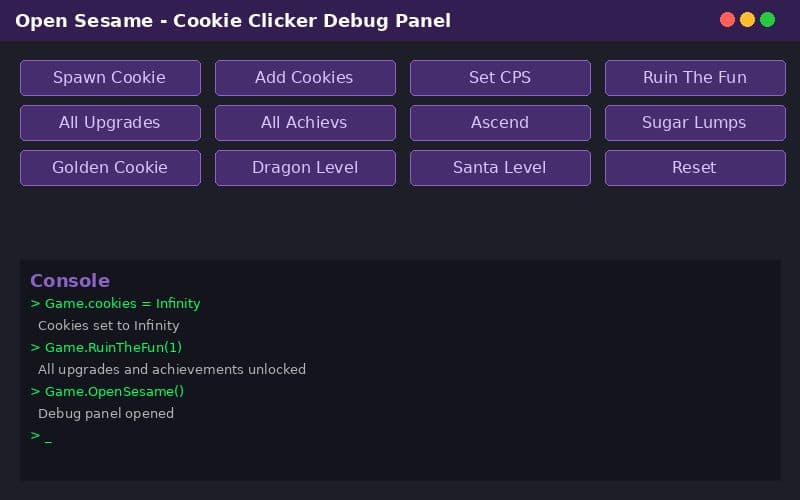
Open Sesame is Cookie Clicker's hidden debug menu. It provides a graphical interface for many of the same cheats you can type in the console, but with clickable buttons instead of code.
How to open Open Sesame
There are two ways:
- Change your bakery name to "Open Sesame" (without quotes). The debug menu icon appears in the top right corner.
- Type in the console:
1Game.OpenSesame();Once opened, you get access to cheat buttons for spawning cookies, toggling upgrades, skipping time, and more. Opening the panel awards the "Cheated cookies taste awful" shadow achievement, even if you never use any of its features.
How do you use an autoclicker in Cookie Clicker?
An autoclicker simulates rapid mouse clicks on the big cookie. The simplest version runs directly in the console:
1var autoClicker = setInterval(Game.ClickCookie, 1);This clicks the cookie once every millisecond, which is about 1,000 clicks per second. To stop it:
1clearInterval(autoClicker);For a more configurable autoclicker, you can install a userscript. Robomonkey offers a Cookie Clicker AI Assistant that handles autoclicking and other features without writing any code.
Cookie Clicker AI Assistant
AI-powered chatbot assistant to control your Cookie Clicker game - set cookies, manage buildings, unlock achievements, and more
How do userscripts work for Cookie Clicker?
Userscripts are JavaScript files that run automatically when you visit a specific website. For Cookie Clicker, they can automate clicking, buying, ascending, and more.
To use Cookie Clicker userscripts, you need a script manager. The options are:
- Tampermonkey - The most popular userscript manager. Available for Chrome, Firefox, Edge, and Safari.
- Robomonkey - A newer alternative that includes a curated script directory and one-click installation. No manual code copying required.
Advantages of userscripts over console commands
| Feature | Console commands | Userscripts |
|---|---|---|
| Runs automatically on page load | No | Yes |
| Survives page refresh | No | Yes |
| Needs manual typing | Yes | No |
| Can be toggled on/off | No | Yes |
| Shareable with others | No | Yes |
Popular Cookie Clicker userscript features
- Auto-buy buildings - Purchases the most cost-effective building automatically
- Auto-click golden cookies - Clicks golden and wrath cookies the moment they appear
- Auto-click reindeer - Clicks reindeer during the Christmas season
- Auto-ascend - Triggers ascension when prestige gains reach a threshold
- Auto-spell - Casts spells in the Grimoire automatically
- Statistics overlay - Shows detailed CPS calculations and efficiency ratings
How do you edit the Cookie Clicker save file?
For advanced hacking, you can export your save file, modify it, and import it back.
- Click "Options" in the game menu.
- Click "Export save" to copy your save string to the clipboard.
- Paste the string into a text editor. It is a base64-encoded JSON object.
- Decode it (use an online base64 decoder), edit the JSON values you want to change, then re-encode it.
- Click "Import save" in the game options and paste the modified string.
This method lets you change anything in your save, including numbers that console commands cannot reach easily.
Does hacking Cookie Clicker have any consequences?
Not really. Cookie Clicker is a single-player idle game with no competitive mode, no leaderboards, and no account system that tracks cheating. The only in-game consequence is earning the "Cheated cookies taste awful" shadow achievement, which is actually a badge of honor for many players.
That said, here are some things to keep in mind:
- Console hacks reset on refresh unless you save the game afterward.
- Setting cookies to Infinity makes the number display break. Some players find this annoying.
- Game.RuinTheFun(1) really does ruin the fun. There is nothing left to work toward after using it.
- Save file editing can corrupt your save if you make a syntax error in the JSON. Always keep a backup.
What is the safest way to hack Cookie Clicker?
The safest approach is using userscripts through a trusted platform. Console commands work fine but require typing code every time you play. Save file editing risks data corruption. Userscripts give you persistent, toggleable automation without those drawbacks.
Robomonkey is a good option for Cookie Clicker userscripts. Every script in the directory is vetted for safety, with readable source code and no hidden payloads. The Cookie Clicker AI Assistant lets you control the game through a chat interface, telling it what you want instead of looking up console commands.
Frequently asked questions
How do you hack Cookie Clicker? Open your browser's developer console (Ctrl+Shift+J on Chrome) and type Cookie Clicker JavaScript commands like Game.Earn(number) to add cookies or Game.RuinTheFun(1) to unlock everything. You can also use the Open Sesame debug panel or install userscripts for automated features.
Is it safe to use Cookie Clicker hacks? Console commands and userscripts only run in your browser and pose no security risk to your device. Cookie Clicker is a single-player game with no account bans for cheating. The only consequence is earning the "Cheated cookies taste awful" shadow achievement.
What is Open Sesame in Cookie Clicker? Open Sesame is Cookie Clicker's built-in debug panel. You can open it by changing your bakery name to "Open Sesame" or by typing Game.OpenSesame() in the console. It gives you access to cheat buttons for spawning cookies, toggling upgrades, and more.
Can you use an autoclicker in Cookie Clicker? Yes. You can use a userscript autoclicker like setInterval(Game.ClickCookie, 1) in the console, or install a dedicated autoclicker script from a userscript manager or Robomonkey. Autoclickers simulate manual clicks at high speed.
Do Cookie Clicker hacks work on mobile? Console commands only work in desktop browsers. However, userscripts installed through a compatible browser extension on mobile Firefox can work. The Robomonkey browser extension also supports some mobile browsers.